本文还原 Red Hat Cloud Services npm 包供应链投毒事件,揭示恶意载荷从凭据窃取到 GitHub/npm 自传播的完整攻击链。
文章作者、来源:慢雾科技 SlowMist
背景
近日,MistEye 安全监控系统捕获到关于 Red Hat Cloud Services 组织下多款 npm 包出现异常版本的情报。本次事件共涉及该组织下 32 个 npm 包、96 个版本。 本文选取其中 3 个本地样本进行深入离线分析:这些样本并非仿冒命名空间或 typo-squatting 包,而是使用 @redhat-cloud-services scope 的真实包版本;从样本源码可以确认,其 tarball 中被植入了会在安装阶段自动触发的多层混淆恶意 loader。
完整还原后可以确认:这 3 个样本的核心载荷具备 GitHub Actions Runner 内存读取、多云与本地凭据采集、GitHub API 外传和 dead-drop、GitHub workflow 注入、npm 自传播、Claude Code / VS Code / systemd / LaunchAgent 持久化、Harden-Runner / StepSecurity 对抗、EDR / 安全产品探测等源码能力。从能力覆盖面看,潜在影响对象包括开发者主机、CI/CD Runner、构建容器、GitHub 仓库、GitHub Actions workflow、npm 发布链路以及云环境凭据;实际影响范围需要结合安装日志、仓库审计和平台侧遥测进一步确认。
从代码结构、传播路径和能力组合看,该恶意软件属于 Shai-Hulud 恶意软件的变体。
MistEye 响应
MistEye 是由 SlowMist 自主研发的 Web3 威胁情报与动态安全监控系统,集成了安全监控与情报聚合能力,为用户提供实时的风险预警与资产守护。
在捕获本次 Red Hat Cloud Services npm 包供应链投毒事件及其关联恶意样本后,MistEye 系统已触发高危告警,对该攻击链的混淆结构、载荷解密、能力还原和 IOC 进行了系统分析。

(https://enterprise.misteye.io/threat-intelligence/SM-2026-378450)
攻击链概览
本文的技术分析部分仅基于本地离线静态分析,对 3 个 npm tgz 样本进行解包、解码和解混淆验证。
本次验证覆盖的样本如下:
@redhat-cloud-services/frontend-components-config
版本:6.11.3
tgz SHA-256:0c9c67ec40d5f23efa1ec3470d0ac88b4993ccc0e92be913fc29a337dfc4f060
@redhat-cloud-services/types
版本:3.6.1
tgz SHA-256:d543bb3cdf1569c2b3d38c8a4081ed746cfe78bf3236c2302704d79ab7fa9558
@redhat-cloud-services/rule-components
版本:4.7.2
tgz SHA-256:aaf00d06baa3c679b82452c50014e9824b8874e9ca2d150f19095f8de19ba90f
三个样本的攻击入口完全一致:package.json 中均存在 scripts.preinstall = "node index.js"。这意味着只要开发者主机或 CI/CD 环境安装到这些版本,根目录 index.js 就会在安装阶段被自动执行,无需用户显式 import 或运行业务代码。
三个样本共享同一个核心恶意载荷,但外层包装参数不同。也就是说,三个样本使用了不同的 ROT/Caesar 位移值和 AES-GCM key / iv / tag;这会使基于外层包装 hash、固定 key 或固定 shift 的静态特征难以直接跨包复用。但解密后的 Bun 运行环境引导器与核心恶意载荷 hash 完全一致:一个是用于准备 Bun 运行环境的启动辅助模块,另一个是真正包含恶意功能的核心载荷。本文将两者分别称为"Bun 运行环境引导器(源码变量名 _b)"和"核心恶意载荷(源码变量名 _p)"。
还原后的攻击链如下:
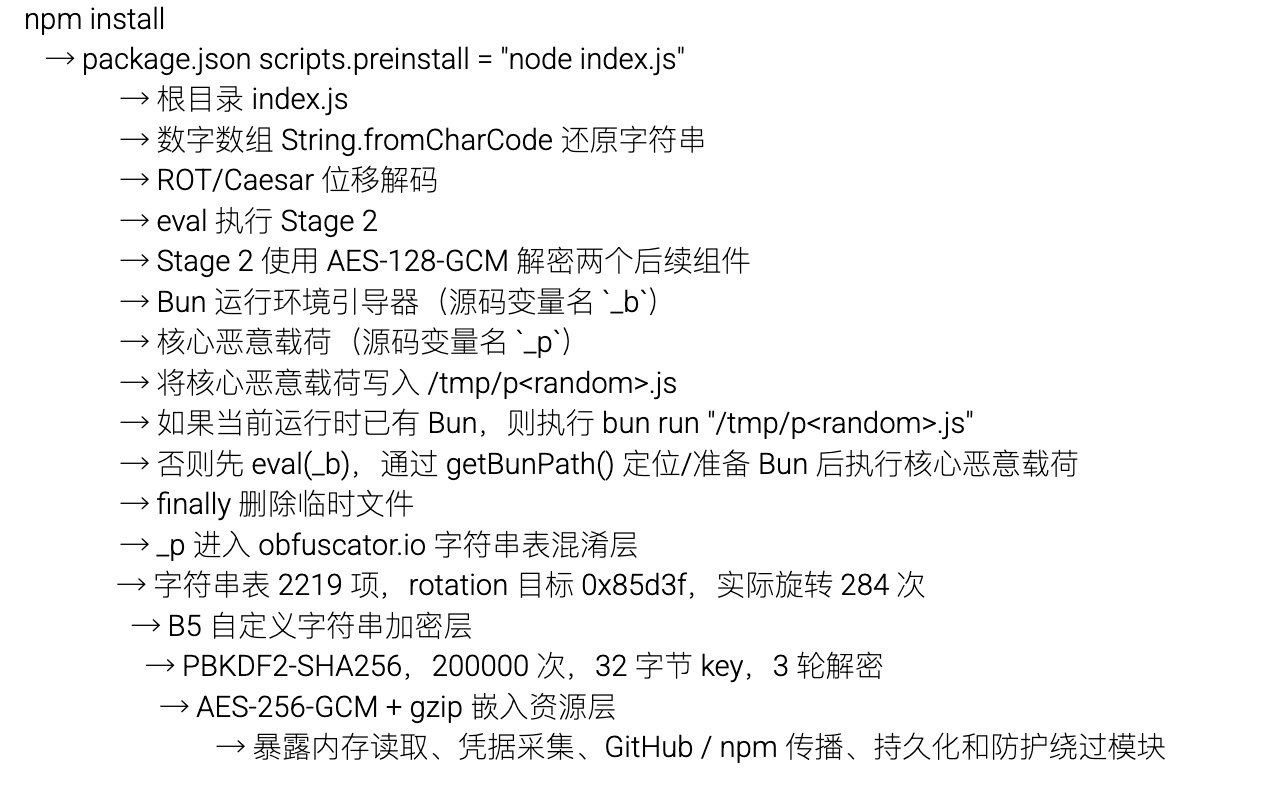
技术分析
1.入口:npm 生命周期脚本劫持
三个样本均通过 package.json 的 preinstall 生命周期钩子触发攻击链:
"scripts": {
"preinstall": "node index.js"
}
preinstall 会在 npm 安装阶段自动执行。对于普通前端组件、类型定义或规则组件包而言,安装阶段通常不需要运行一个根目录大体积 JavaScript 文件;这一点是最直接的异常信号。
样本级证据如下:
@redhat-cloud-services/frontend-components-config@6.11.3
- main:lib/index.js
- files 字段:["/lib", "/bin"]
- 根目录 index.js SHA-256:545a1838c66e1771f58d84a17b3e1841e5eeab91a73f4ccc59c9492450a6d9c0
@redhat-cloud-services/types@3.6.1
- main:index.d.ts
- files 字段:未设置
- 根目录 index.js SHA-256:b86c5ae9e95bd841a595440faa3eb6317441e746f241ae8fd641ab59ed1d1966
@redhat-cloud-services/rule-components@4.7.2
- main:index.js
- files 字段:未设置
- 根目录 index.js SHA-256:1a30a9abe20bab121aaa75ed040565af14e6cdfb745609ee0e7b94a2d814fb9c
其中,frontend-components-config@6.11.3 的 files 字段仅声明 "/lib" 与 "/bin",但 tarball 根目录中存在额外 index.js 并被 preinstall 调用。这一异常只在该样本中成立;types@3.6.1 和 rule-components@4.7.2 未设置 files 字段,因此不把该异常泛化到所有样本。

2.第一层:数字数组 + ROT/Caesar 字母替换
三个样本的根目录 index.js 都是超大单行 JavaScript 文件,结构一致,主体是 try { eval(...) } catch (...) 包装器:

该包装器先将巨大数字数组通过 String.fromCharCode 还原为字符串,再对字符串中的英文字母执行 ROT/Caesar 位移,最后将解码结果交给 eval 执行。异常处理只输出 wrapper: 前缀,降低安装失败时的显著异常暴露。
三个样本的外层位移值和 Stage 2 hash 如下:
frontend-components-config@6.11.3
index.js 大小:4,294,798 bytes
ROT/Caesar shift:10
Stage 2 SHA-256:b19c2fd48535c8c40aeb3e627ce92775f33ef9292611767bb1236c238e6f90cc
types@3.6.1
index.js 大小:4,135,588 bytes
ROT/Caesar shift:4
Stage 2 SHA-256:9c0425aa6e6d7792ac38d24f3e7245f42fcaa553ddfeb6bd97677017f10c3b75
rule-components@4.7.2
index.js 大小:4,294,336 bytes
ROT/Caesar shift:11
Stage 2 SHA-256:d590bd375d95e4ac072b7ebc1fc4489bcaf5f20a939e92486267aa398bcf1e5d
3.第二层:AES-128-GCM 解密 Bun 引导器与核心载荷
ROT/Caesar 解码后的 Stage 2 代码使用 Node.js crypto.createDecipheriv 执行 AES-128-GCM(Advanced Encryption Standard - Galois/Counter Mode)解密,并通过 setAuthTag 设置认证标签。解密目标为两个后续组件——Bun 运行环境引导器与核心恶意载荷。

其中,Bun 运行环境引导器负责检测、定位或准备 Bun 运行环境,使后续代码能够通过 Bun 执行;核心恶意载荷则是攻击链的主体,包含后续凭据采集、GitHub/npm 传播、持久化、防护对抗和嵌入资源解密等主要恶意能力。
三份样本各自使用了不同的 AES-128-GCM 密钥、初始向量和认证标签来加密这两个组件,但解密后三份 Bun 运行环境引导器的 SHA-256 均为 ac2a2208e1726e008be6c73dc0872d9bba163319259dff1b62055ac933ca46b6,三份核心恶意载荷的 SHA-256 均为 0dc06ecdaa63fe24859cfd955053c23245c536e4733480239d14bebf12688e35。这表明攻击者在不同 npm 包中更换了外层包装参数,但复用了同一套核心恶意组件。
解密后,Stage 2 会将核心恶意载荷写入 /tmp,再通过 Bun 执行,最后删除临时文件。三份样本还原出的实际逻辑如下:

因此,三份样本中可验证的临时文件模式是:
/tmp/p<random>.js
Bun 运行环境引导器大小为 898 bytes,三个样本 hash 完全一致:
ac2a2208e1726e008be6c73dc0872d9bba163319259dff1b62055ac933ca46b6
Bun 运行环境引导器包含 child_process.execSync、fs.existsSync、fs.mkdtempSync、fs.chmodSync、os.platform()、os.arch()、getBunPath() 等逻辑,用于定位或准备 Bun 运行环境。也就是说,Stage 2 不是简单假设系统已安装全局 Bun;在非 Bun 运行时路径中,它会先加载 Bun 运行环境引导器,再通过 getBunPath() 调用 Bun 执行核心恶意载荷。

4.第三层:obfuscator.io 字符串表
解密出的核心恶意载荷并不是可直接阅读的明文 JavaScript,而是继续经过 obfuscator.io 风格的字符串表混淆。该层会把大量字符串集中放入数组,并通过运行时索引和 rotation 逻辑还原,导致分析人员在未完成字符串表还原前,无法直接检索到后续关键 API、路径和配置名。
5.第四层:B5 自定义字符串加密
还原 obfuscator.io 字符串表后, 核心恶意载荷内仍存在一层 B5 自定义字符串加密。已确认参数如下:
- KDF:PBKDF2(Password-Based Key Derivation Function 2)
- 哈希函数:SHA-256
- 迭代次数:200000
- key length:32 bytes
- 解密轮数:3
- password:ba2c6ddb3672bdd6a611e6850b4f700b52aed3dab2f1b3d5f8c839d4a157a709
- salt:5b26508dc0f1075a7c0b4d8aa464487e
解密后结果如下:

其中,B5 解密后可见多类关键明文字符串。需要注意,部分字符串原本位于 obfuscator.io 字符串表中,只有在“字符串表替换 + B5 解密”两步都完成后才会直接可 grep:
6.额外嵌入层:AES-256-GCM + gzip
核心恶意载荷内部还包含 AES-256-GCM 加密并 gzip 压缩的嵌入资源。还原逻辑使用:

已解出的关键嵌入资源按功能分为三类:
跨平台内存读取:
这一类资源用于读取正在运行的进程内存。普通文件里的密钥、token 还能通过查文件发现,但 CI/CD Runner 或开发工具在运行时会把一些敏感值暂存在内存里。攻击者嵌入 Linux、Windows、macOS 三个平台的内存读取脚本,目的就是在不同系统上尽可能从进程内存中抓取这些临时出现的 secret。
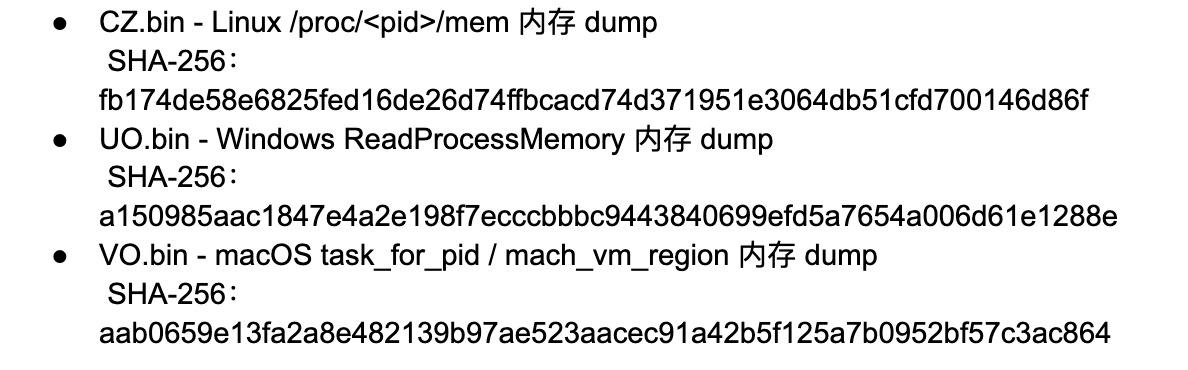
持久化配置:
这一类资源用于“留下后门触发点”。也就是说,即使最初的 npm 安装过程已经结束,攻击者仍希望恶意代码能在开发者后续打开项目、启动编辑器、进入 Claude Code 会话,或系统重新登录后再次运行。因此这些资源分别瞄准项目级配置和用户级自启动机制:项目级配置更隐蔽,系统级服务更适合长期运行。
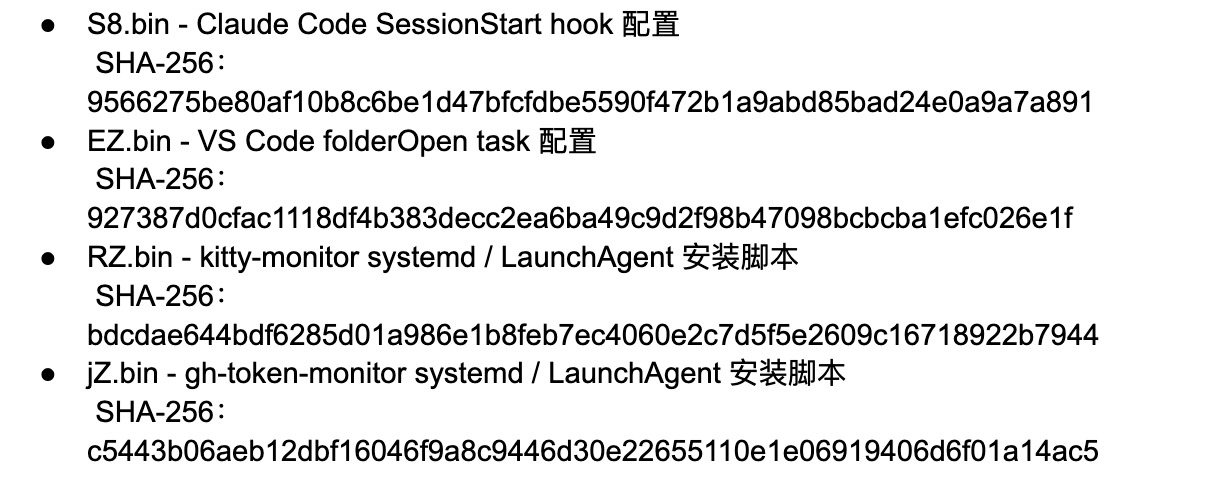
C2 与传播:
这类嵌入资源用于后续控制链路和仓库 secrets 搬运。YZ 解密后是 GitHub commit search monitor,会周期性搜索 firedalazer <base64-url>.<signature> 格式的 commit message,校验签名后下载并执行远端 Python 内容;zZ 解密后是一段名为 Run Copilot 的 GitHub Actions workflow 模板,会将 ${{ toJSON(secrets) }} 写入 format-results.txt 并上传为 artifact。前者提供后续任务获取/执行链路,后者提供借 GitHub Actions artifact 搬运 repository secrets 的模板;实际 workflow 注入、运行等待和 artifact 下载由主载荷中的配套 GitHub API 逻辑完成。
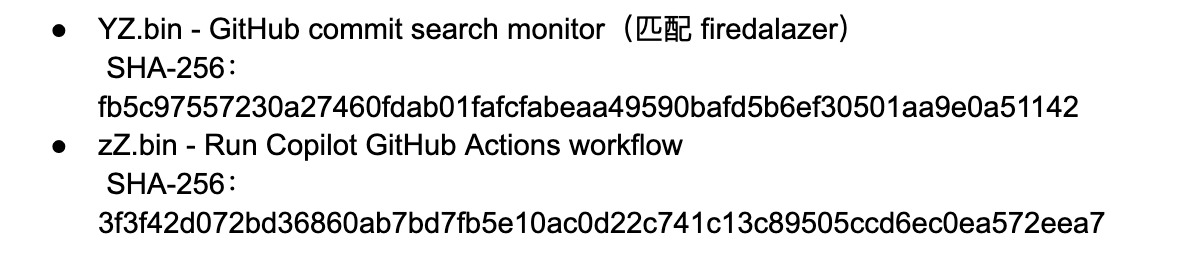
核心恶意载荷能力分析
在完成多层解混淆后,样本最终释放并执行的是核心恶意载荷。以下所有分析均针对核心恶意载荷模块展开,按数据获取、外传、传播、持久化、对抗五个环节逐一拆解。
1.GitHub Actions Runner 内存读取:
样本嵌入了 Linux、Windows、macOS 三个平台的内存读取脚本,具备跨平台 dump 能力。其中 Linux 实现通过读取目标进程的 /proc//maps 与 /proc//mem 完成内存抽取:

核心恶意载荷的主动触发逻辑针对 GitHub Actions Linux runner:当 GITHUB_ACTIONS === "true" 且 RUNNER_OS === "Linux" 时,代码查找 Runner.Worker 进程并 dump 内存,随后从 dump 中提取 "":{"value":"","isSecret":true} 格式的 masked secrets。三份样本中可确认的主动采集路径聚焦于 Linux runner,但三平台脚本均已嵌入。
2.多云与开发者本地凭据采集:
核心恶意载荷包含系统化的凭据采集模块,覆盖云厂商、CI 环境、开发者本地配置、GitHub CLI、密码管理器和钱包文件。
云厂商凭据采集目标如下:
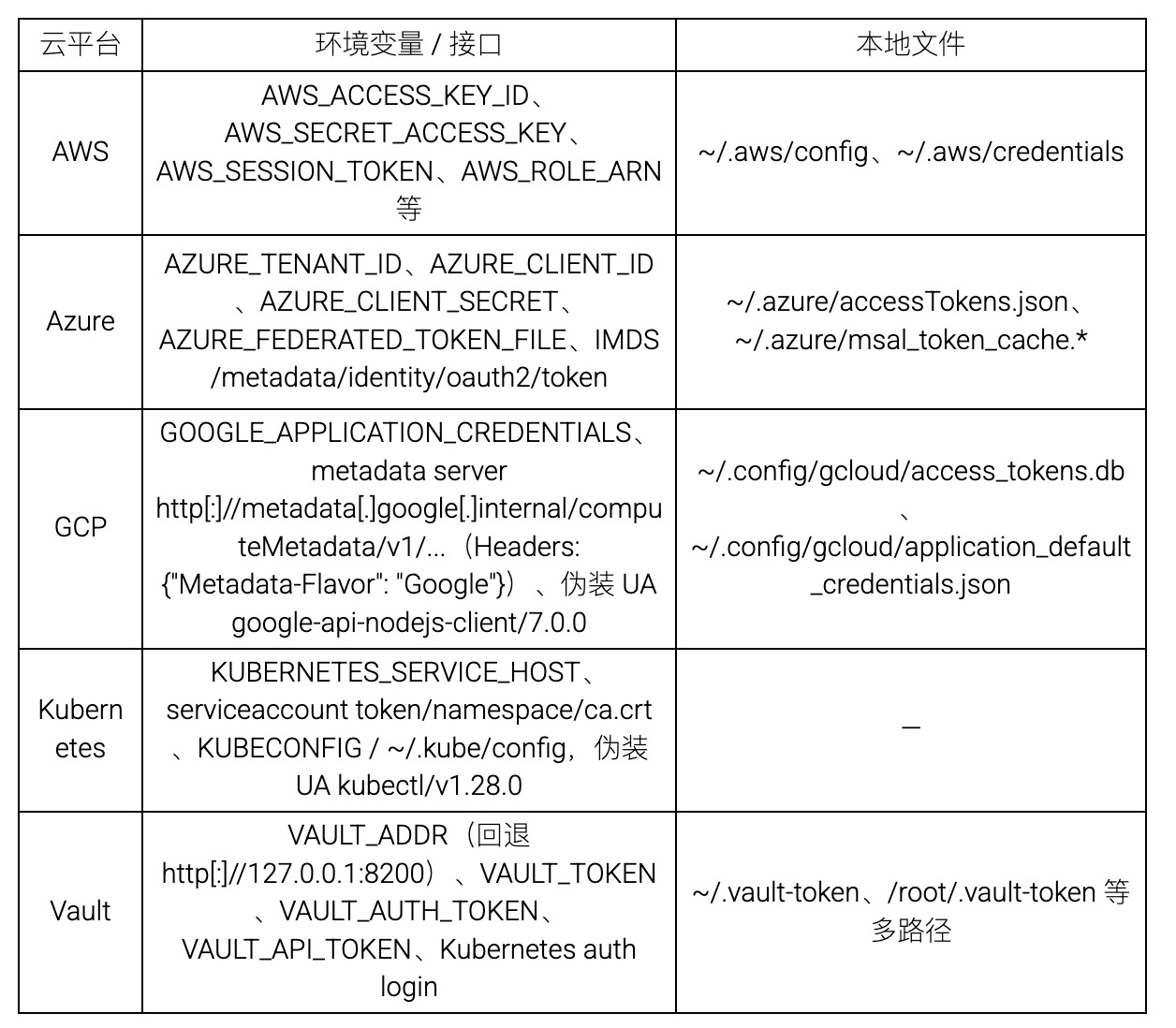
AWS 模块还包含 ECS / IMDS(Instance Metadata Service)/ STS WebIdentity 相关逻辑。
开发者本地凭据采集覆盖以下目标:
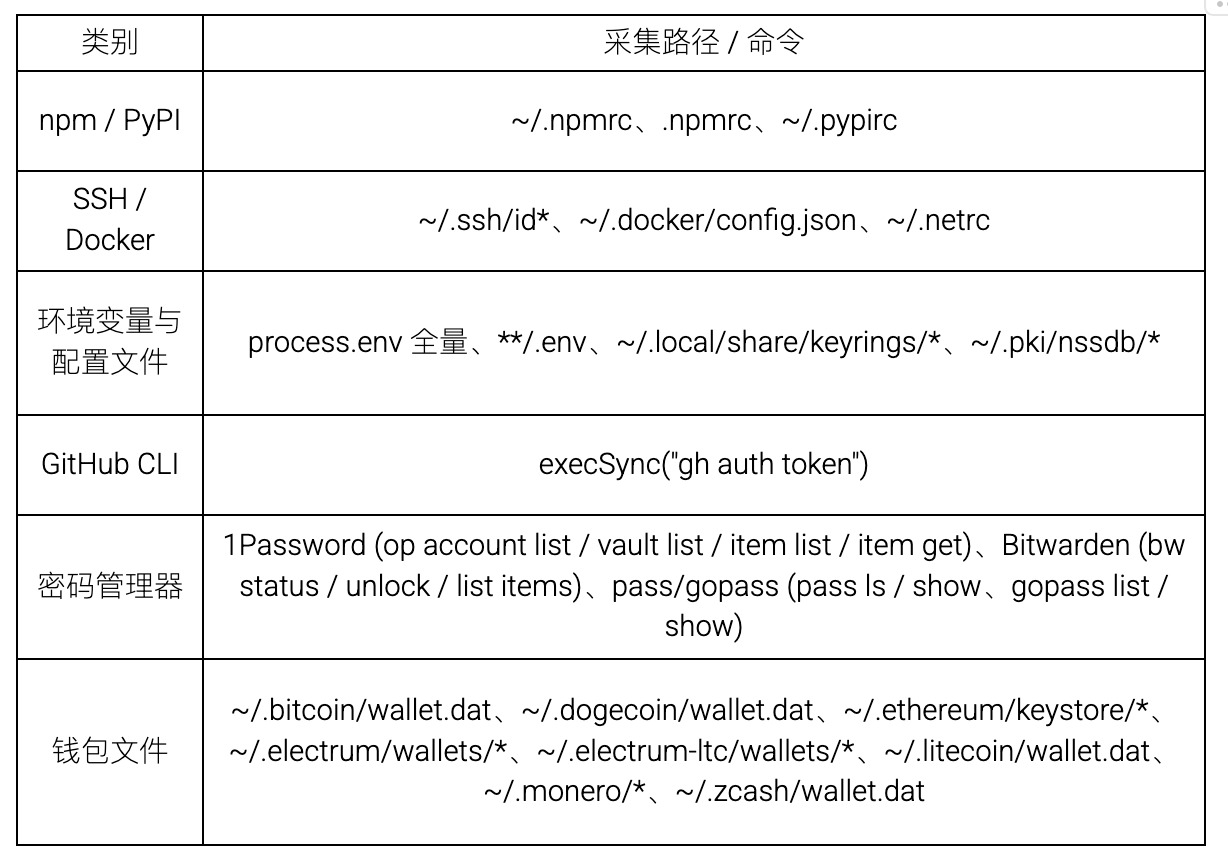
密码管理器逻辑在源码中以 runCommand(command, args) 数组形式实现,而非 shell 字符串拼接。
以上凭据采集模块覆盖了从云平台到开发者本地的广泛目标;采集到的敏感数据通过以下机制实现外传。
3.GitHub API 外传与 dead-drop:
核心恶意载荷以 GitHub API 作为主要数据外传通道。请求伪装 User-Agent 为 python-requests/2.31.0,通过验证 token 的 x-oauth-scopes(需包含 repo、public_repo 或 workflow)后执行外传操作:创建 repository(description 固定为 Miasma: The Spreading Blight),将窃取数据经 base64 编码后通过 PUT /repos///contents/results/ 写入。
此外,载荷实现了基于 GitHub commit search 的 dead-drop 机制,通过搜索 marker "thebeautifulmarchoftime "(或 "thebeautifulsnadsoftime")获取 C2 指令:
let result = await X9("thebeautifulmarchoftime ", xZ);
嵌入资源 YZ.bin 是一个独立的 GitHub commit monitor,以 3600 秒为间隔轮询搜索 firedalazer . 格式的 commit message,签名校验通过后下载并执行远端 Python 内容。这构成了一条独立于主外传通道的后续控制链路。
源码中还包含一个以 api.anthropic.com 和 v1/api 为目标端点的 HTTP POST sender 配置体。该配置体的 noop 字段被设为 true,意味着在未被外部修改的情况下该 sender 不会发起实际网络请求。因此静态分析只能确认该代码结构存在,不能证明存在活跃的 Anthropic API 外传行为。
4.GitHub 仓库与 Workflow 感染:
核心恶意载荷可通过 GitHub REST / GraphQL API 操作仓库的 git 对象:
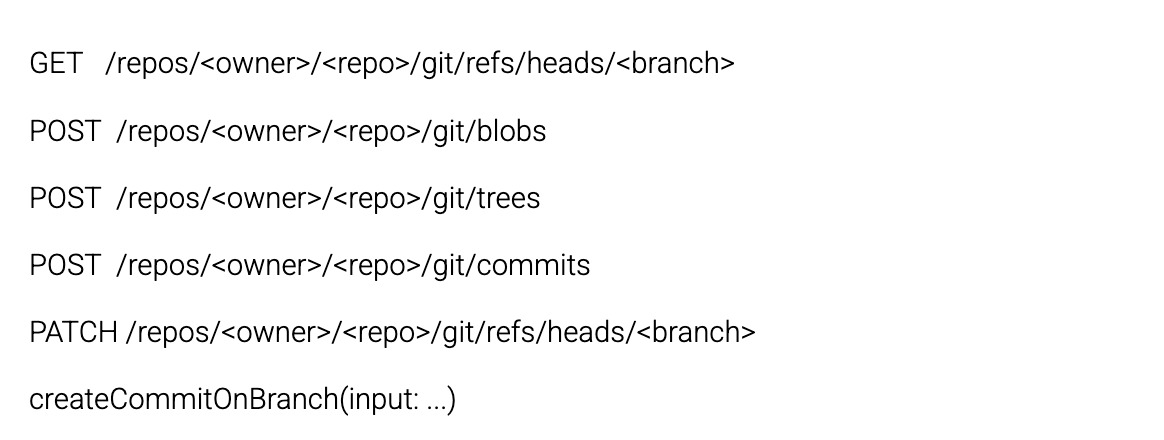
载荷构造的恶意 workflow 以 release 为名,请求 id-token: write 权限,通过 OIDC(OpenID Connect)路径换取 npm 发布 token。OIDC 路径的环境变量与接口为 ACTIONS_ID_TOKEN_REQUEST_TOKEN、ACTIONS_ID_TOKEN_REQUEST_URL,audience 设置为 npm:registry.npmjs.org。源码层面可确认 payload 具备向 GitHub 仓库注入 workflow、利用 OIDC / npm trusted publishing 获取发布权限的能力。
除上述通过 git refs 注入 workflow 的方式外,载荷还嵌入了一套更隐蔽的 secrets 搬运机制:伪装为 Run Copilot 的 GitHub Actions workflow 将 ${{ toJSON(secrets) }} 写入 format-results.txt 并上传 artifact。与直接把 secrets 写入仓库内容相比,这种方式更偏向通过 workflow 运行产物搬运数据,常规代码 diff 审查未必能直接看到最终导出的 secrets 内容。
5.Run Copilot workflow 通过 artifact 搬运 secrets:
嵌入资源 zZ.bin 是伪装成 Copilot 的 GitHub Actions workflow,将 ${{ toJSON(secrets) }} 写入 format-results.txt 并上传为 artifact。
配套的 GitHub API 行为包括:创建/更新临时 branch → 写入 workflow blob → 等待 workflow run → 下载 artifact zip → 读取 format-results.txt → 删除 workflow run 和临时 branch。相关 hunting 关键词包括 Run Copilot、VARIABLE_STORE、format-results、chore/add-codeql-static-analysis、.github/workflows/codeql.yml。
6.npm 自传播:
核心恶意载荷具备两条独立的 npm 发布 / 传播路径。
npm token 路径: 载荷通过 GET /-/npm/v1/tokens 枚举当前用户的 npm token,筛选 bypass_2fa === true 且具备 package write 权限的 token,利用这些 token 实现自动化发布。bypass_2fa 是 token metadata 字段,并非 publish body 参数。
GitHub Actions OIDC 路径: 载荷读取 ACTIONS_ID_TOKEN_REQUEST_TOKEN 和 ACTIONS_ID_TOKEN_REQUEST_URL 环境变量,请求 audience 为 npm:registry.npmjs.org 的 OIDC token,通过 npm OIDC token exchange 接口换取发布权限。
污染目标 tarball 的操作流程为解包 → 写入恶意 index.js → 修改 package.json:

这里区分两类入口:三份本地上传样本自身使用 preinstall: "node index.js"——此时安装环境无需预先安装 Bun,以 Node.js 作为初始入口更隐蔽;自传播污染其他包时则写入 preinstall: "bun run index.js" 并新增 bun 依赖——因为核心恶意载荷的后续逻辑依赖 Bun 运行时提供的 API(如 Bun.gunzipSync 和 Bun.file),在自传播场景中需要确保目标环境已具备 Bun。
7.持久化机制:
核心恶意载荷包含四种持久化方式,覆盖项目目录和系统级自启动。
Claude Code SessionStart hook: 嵌入资源 S8.bin 将 SessionStart hook 写入 .claude/settings.json,每次 Claude Code 会话启动时自动执行 node .claude/setup.mjs。 恶意载荷同时写入 .claude/setup.mjs 和 .claude/index.js(路径由 ".claude/" + M0 拼接,M0 = "index.js")。
VS Code folderOpen task: 嵌入资源 EZ.bin 将 folderOpen task 写入 .vscode/tasks.json,打开受感染项目文件夹时自动执行同一脚本。同时写入 .vscode/setup.mjs。
kitty-monitor(systemd / LaunchAgent): 嵌入资源 RZ.bin 安装持久化服务,文件分布在 /.local/share/kitty/cat.py、/.config/systemd/user/kitty-monitor.service(Linux)和 ~/Library/LaunchAgents/com.user.kitty-monitor.plist(macOS)。 恶意载荷创建 /tmp/kitty- 目录,将 YZ.bin(GitHub commit monitor)写入 cat.py 后通过 RZ.bin 安装。
gh-token-monitor(systemd / LaunchAgent): 嵌入资源 jZ.bin 安装 GitHub token 监控服务,文件分布在 /.local/bin/gh-token-monitor.sh、/.config/gh-token-monitor/ 目录和对应的 systemd / LaunchAgent 路径。该 monitor 检测 GitHub token 是否返回 40x 状态码以及 npm 包 @cap-js/openapi@1.4.1 的 metadata 是否异常,触发后执行 handler:

这意味着当 monitor 观察到 GitHub API 返回 40x 状态码时,例如 token 被吊销、失效或权限状态异常,恶意脚本会执行传入的 handler。本文三份样本中还原出的 handler 为 rm -rf ~/; rm -rf ~/Documents。处置时不能直接在可能仍运行 payload 的主机上吊销 token——应先隔离主机,清理持久化项和运行中进程,再从干净环境轮换凭据。

8.Harden-Runner / StepSecurity 对抗:
核心恶意载荷内置针对 StepSecurity Harden-Runner 的检测与破坏逻辑,通过以下步骤绕过 CI/CD 防护:
- 检测 Docker socket /var/run/docker.sock 是否可用;
- 枚举 Docker 容器,匹配名称或镜像中的 harden-runner / stepsecurity 关键词;
- 通过 POST /containers//kill 终止匹配容器;
- 创建 privileged alpine 容器,将 sudoers 改写为 runner ALL=(ALL) NOPASSWD:ALL;
- 向 /etc/hosts 写入 StepSecurity 相关域名的无效解析;
- 覆盖 /etc/resolv.conf 为 8.8.8.8 和 1.1.1.1。
该对抗逻辑表明样本专门针对受 StepSecurity 保护的 CI/CD 环境进行了适配。
9.EDR / 安全产品探测、环境判断与规避:
核心恶意载荷探测多种 EDR(Endpoint Detection and Response)/ 安全产品的进程名和安装路径:
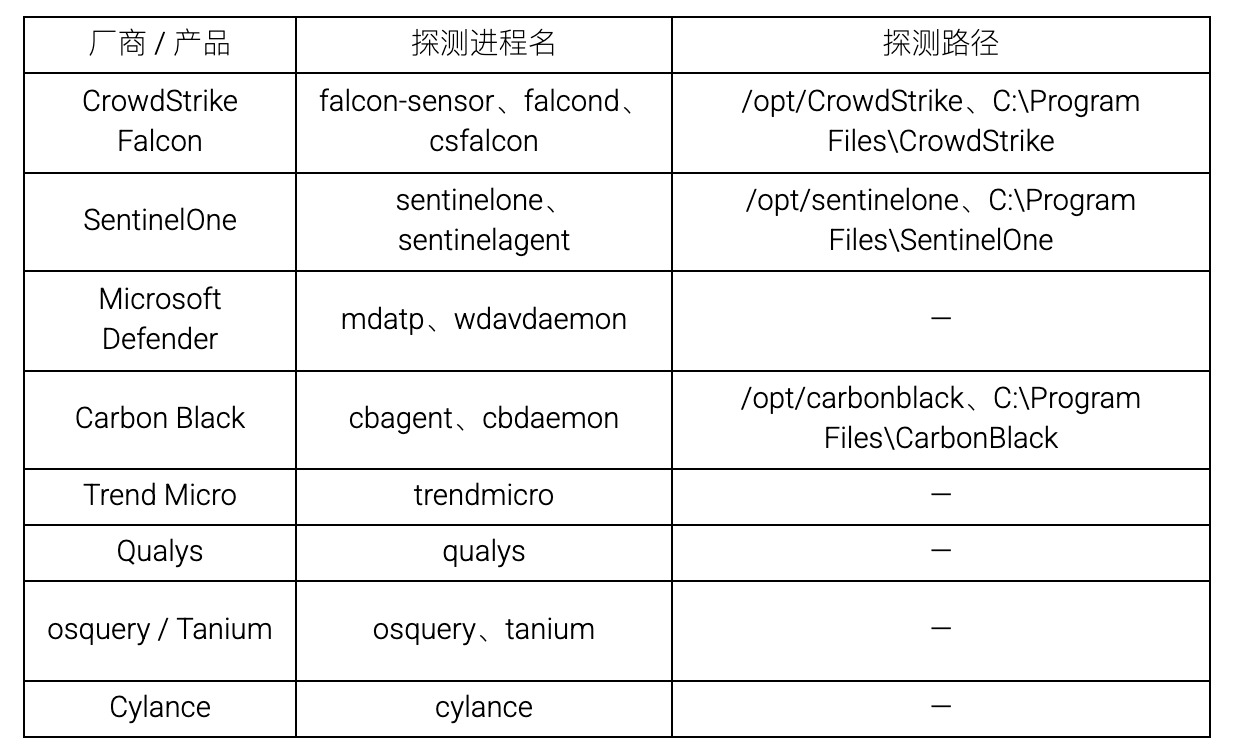
载荷还包含区域规避逻辑:检测 LC_ALL、LC_MESSAGES、LANGUAGE、LANG 环境变量,转小写后若以 ru 开头则跳过执行。CI 环境识别支持 GitHub Actions、GitLab CI、Travis CI、CircleCI、Jenkins、AWS CodeBuild、Buildkite、AppVeyor、Bitbucket、Drone、TeamCity、Cirrus CI 等。运行期使用的状态标记包括 tmp.0987654321.lock、__IS_DAEMON(标记 detached daemon 子进程)、SKIP_DOMAIN(跳过 domain sender 路径)、/tmp/kitty-*、cat.py 和 /var/tmp/.gh_update_state。
影响分析
从源码能力看,这三个样本的影响不局限于 npm 安装阶段的一次性执行。其实际风险可以分为四层:
开发者主机层面。 样本会采集环境变量、.npmrc、.pypirc、SSH key、Docker 配置、.env、GitHub CLI token、密码管理器数据和钱包文件,并通过 Claude Code、VS Code、systemd user service 或 macOS LaunchAgent 维持后续触发能力。
CI/CD Runner 层面。 样本会识别 GitHub Actions Linux runner,读取 Runner.Worker 进程内存并提取 masked secrets;同时具备 StepSecurity Harden-Runner 对抗逻辑,试图破坏或绕过 CI/CD 防护组件。
GitHub 组织与仓库层面。 样本可使用 GitHub API 创建仓库、写入 contents/results/、操作 git refs/blobs/trees/commits、注入恶意 workflow,并通过 Run Copilot workflow + artifact 搬运 secrets。
npm 生态传播层面。 样本可筛选具备 package write 权限且 bypass_2fa === true 的 npm token,也可利用 GitHub Actions OIDC / npm trusted publishing 路径换取发布能力;随后下载目标 tarball、写入恶意 loader、修改 preinstall、添加 Bun 依赖、提升 patch 版本并发布,从而形成 npm 自传播链条。
总结
三份样本的源码证据显示,本次恶意包并不是简单的安装期窃密脚本,而是一个多阶段 loader 加完整 implant 的组合:外层按包随机化,Bun 运行环境引导器与核心恶意载荷保持一致;主 implant 覆盖凭据采集、CI secret 提取、GitHub / npm 传播、持久化与防护对抗等多个环节。
高隐蔽性的入口设计。 攻击者不在业务代码中植入恶意逻辑,而是在 npm 生命周期脚本中挂载混淆 loader。该 loader 自身主要负责解密并执行内嵌载荷,使得仅靠业务源码审查很难发现真实能力。
多层嵌套的解混淆链。 恶意载荷经过数字数组 + ROT 字母替换、AES-128-GCM 加密、obfuscator.io 混淆、B5 自研字符串加密、AES-256-GCM + gzip 嵌入层共五层包装。每一层的密钥或参数在不同包中可独立变化,使得基于静态特征的批量检测更加困难。
完整的组织级攻击能力。 该 implant 具备 GitHub Actions Runner 内存读取、多云与本地凭据采集、GitHub API 外传与 dead-drop、GitHub 仓库与 workflow 感染、npm 自传播、持久化和防护对抗等能力。从源码结构看,它已经具备从单点安装触发进一步扩散到仓库、CI/CD 和 npm 发布链路的代码路径;真实扩散范围仍需结合安装日志、仓库审计和平台侧遥测确认。
从源码证据能够确认的是:三个样本均通过 preinstall 自动触发,并解密执行同一主 implant。至于真实事件中初始权限如何获得,不能仅凭这三份 tgz 样本证明。
处置建议
- 在项目依赖、lockfile、私有 registry 缓存和构建缓存中排查并移除恶意版本。
- 排查安装日志中是否出现 preinstall、node index.js、bun run、/tmp/p*.js、tmp.0987654321.lock。
- 不要在仍可能运行 payload 的受害主机上直接吊销 token。建议先隔离受害主机,清理运行中进程和持久化项,再从干净环境轮换 GitHub、npm、云凭据、Kubernetes、Vault、SSH、Docker registry、密码管理器相关 token。
- 检查 GitHub 仓库最近 branch、commit、workflow、artifact 和新建 repository,重点关注 Run Copilot、format-results、chore/add-codeql-static-analysis、.github/workflows/codeql.yml、OIDC_PACKAGES 等关键词。
- 检查项目目录是否新增或被修改:.claude/settings.json、.claude/setup.mjs、.vscode/tasks.json、.vscode/setup.mjs。
- 检查用户级持久化:/.local/share/kitty/cat.py、/.config/systemd/user/kitty-monitor.service、~/Library/LaunchAgents/com.user.kitty-monitor.plist、gh-token-monitor 相关文件。
- 检查 npm publish history,确认是否存在未经授权的 patch 版本发布;同时审计 npm token metadata,重点关注可 bypass 2FA(Two-Factor Authentication)且具备 package write 权限的 token。
- 对受污染环境中构建出的下游制品进行完整性审计。
IOC
恶意文件
filename: redhat-cloud-services-frontend-components-config-6.11.3.tgz MD5: 633ad8849a59e2bfb7a0fe589e816a07 SHA1: 675294612f455fe6a9acb195f0cbe3687d8e2e34 SHA256: 0c9c67ec40d5f23efa1ec3470d0ac88b4993ccc0e92be913fc29a337dfc4f060
filename: redhat-cloud-services-types-3.6.1.tgz MD5: 9e6c5af01438b52c9a411686c1f1b8ff SHA1: 88d098c8d96e9ae17550e9798c3b62c420464b8c SHA256: d543bb3cdf1569c2b3d38c8a4081ed746cfe78bf3236c2302704d79ab7fa9558
filename: redhat-cloud-services-rule-components-4.7.2.tgz MD5: f1ffdbf5e639899f26a6ebab2eec408d SHA1: f3c5c21274045ae02fef11e931de6dcf8462a067 SHA256: aaf00d06baa3c679b82452c50014e9824b8874e9ca2d150f19095f8de19ba90f
SHA256
ac2a2208e1726e008be6c73dc0872d9bba163319259dff1b62055ac933ca46b6
0dc06ecdaa63fe24859cfd955053c23245c536e4733480239d14bebf12688e35
恶意依赖
npm:@redhat-cloud-services/topological-inventory-client@3.0.10
npm:@redhat-cloud-services/topological-inventory-client@3.0.11
npm:@redhat-cloud-services/topological-inventory-client@3.0.13
npm:@redhat-cloud-services/compliance-client@4.0.3
npm:@redhat-cloud-services/compliance-client@4.0.4
npm:@redhat-cloud-services/compliance-client@4.0.6
npm:@redhat-cloud-services/rbac-client@9.0.3
npm:@redhat-cloud-services/rbac-client@9.0.4
npm:@redhat-cloud-services/rbac-client@9.0.6
npm:@redhat-cloud-services/insights-client@4.0.4
npm:@redhat-cloud-services/insights-client@4.0.5
npm:@redhat-cloud-services/insights-client@4.0.7
npm:@redhat-cloud-services/frontend-components@7.7.2
npm:@redhat-cloud-services/frontend-components@7.7.3
npm:@redhat-cloud-services/frontend-components@7.7.5
npm:@redhat-cloud-services/frontend-components-utilities@7.4.1
npm:@redhat-cloud-services/frontend-components-utilities@7.4.2
npm:@redhat-cloud-services/frontend-components-utilities@7.4.4
npm:@redhat-cloud-services/remediations-client@4.0.4
npm:@redhat-cloud-services/remediations-client@4.0.5
npm:@redhat-cloud-services/remediations-client@4.0.7
npm:@redhat-cloud-services/frontend-components-notifications@6.9.2
npm:@redhat-cloud-services/frontend-components-notifications@6.9.3
npm:@redhat-cloud-services/frontend-components-notifications@6.9.5
npm:@redhat-cloud-services/patch-client@4.0.4
npm:@redhat-cloud-services/patch-client@4.0.5
npm:@redhat-cloud-services/patch-client@4.0.7
npm:@redhat-cloud-services/host-inventory-client@5.0.3
npm:@redhat-cloud-services/host-inventory-client@5.0.4
npm:@redhat-cloud-services/host-inventory-client@5.0.6
npm:@redhat-cloud-services/rule-components@4.7.2
npm:@redhat-cloud-services/rule-components@4.7.3
npm:@redhat-cloud-services/rule-components@4.7.5
npm:@redhat-cloud-services/frontend-components-advisor-components@3.8.2
npm:@redhat-cloud-services/frontend-components-advisor-components@3.8.4
npm:@redhat-cloud-services/frontend-components-advisor-components@3.8.6
npm:@redhat-cloud-services/notifications-client@6.1.4
npm:@redhat-cloud-services/notifications-client@6.1.5
npm:@redhat-cloud-services/notifications-client@6.1.7
npm:@redhat-cloud-services/sources-client@3.0.10
npm:@redhat-cloud-services/sources-client@3.0.11
npm:@redhat-cloud-services/sources-client@3.0.13
npm:@redhat-cloud-services/integrations-client@6.0.4
npm:@redhat-cloud-services/integrations-client@6.0.5
npm:@redhat-cloud-services/integrations-client@6.0.7
npm:@redhat-cloud-services/frontend-components-config@6.11.3
npm:@redhat-cloud-services/frontend-components-config@6.11.4
npm:@redhat-cloud-services/frontend-components-config@6.11.6
npm:@redhat-cloud-services/frontend-components-config-utilities@4.11.2
npm:@redhat-cloud-services/frontend-components-config-utilities@4.11.3
npm:@redhat-cloud-services/frontend-components-config-utilities@4.11.5
npm:@redhat-cloud-services/hcc-pf-mcp@0.6.1
npm:@redhat-cloud-services/hcc-pf-mcp@0.6.2
npm:@redhat-cloud-services/hcc-pf-mcp@0.6.4
npm:@redhat-cloud-services/frontend-components-remediations@4.9.2
npm:@redhat-cloud-services/frontend-components-remediations@4.9.3
npm:@redhat-cloud-services/frontend-components-remediations@4.9.5
npm:@redhat-cloud-services/eslint-config-redhat-cloud-services@3.2.1
npm:@redhat-cloud-services/eslint-config-redhat-cloud-services@3.2.2
npm:@redhat-cloud-services/eslint-config-redhat-cloud-services@3.2.4
npm:@redhat-cloud-services/javascript-clients-shared@2.0.8
npm:@redhat-cloud-services/javascript-clients-shared@2.0.9
npm:@redhat-cloud-services/javascript-clients-shared@2.0.11
npm:@redhat-cloud-services/quickstarts-client@4.0.11
npm:@redhat-cloud-services/quickstarts-client@4.0.12
npm:@redhat-cloud-services/quickstarts-client@4.0.14
npm:@redhat-cloud-services/config-manager-client@5.0.4
npm:@redhat-cloud-services/config-manager-client@5.0.5
npm:@redhat-cloud-services/config-manager-client@5.0.7
npm:@redhat-cloud-services/hcc-feo-mcp@0.3.1
npm:@redhat-cloud-services/hcc-feo-mcp@0.3.2
npm:@redhat-cloud-services/hcc-feo-mcp@0.3.4
npm:@redhat-cloud-services/entitlements-client@4.0.11
npm:@redhat-cloud-services/entitlements-client@4.0.12
npm:@redhat-cloud-services/entitlements-client@4.0.14
npm:@redhat-cloud-services/tsc-transform-imports@1.2.2
npm:@redhat-cloud-services/tsc-transform-imports@1.2.4
npm:@redhat-cloud-services/tsc-transform-imports@1.2.6
npm:@redhat-cloud-services/hcc-kessel-mcp@0.3.1
npm:@redhat-cloud-services/hcc-kessel-mcp@0.3.2
npm:@redhat-cloud-services/hcc-kessel-mcp@0.3.4
npm:@redhat-cloud-services/frontend-components-testing@1.2.1
npm:@redhat-cloud-services/frontend-components-testing@1.2.2
npm:@redhat-cloud-services/frontend-components-testing@1.2.4
npm:@redhat-cloud-services/types@3.6.1
npm:@redhat-cloud-services/types@3.6.2
npm:@redhat-cloud-services/types@3.6.4
npm:@redhat-cloud-services/chrome@2.3.1
npm:@redhat-cloud-services/chrome@2.3.2
npm:@redhat-cloud-services/chrome@2.3.4
npm:@redhat-cloud-services/frontend-components-translations@4.4.1
npm:@redhat-cloud-services/frontend-components-translations@4.4.2
npm:@redhat-cloud-services/frontend-components-translations@4.4.4
npm:@redhat-cloud-services/vulnerabilities-client@2.1.8
npm:@redhat-cloud-services/vulnerabilities-client@2.1.9
npm:@redhat-cloud-services/vulnerabilities-client@2.1.11